How to Create OTP Input with Tailwind CSS
Published
•3 min read
Welcome to our tutorial! Today, we're diving into Tailwind CSS to create clean and efficient OTP input fields. Whether it's a 4-digit or 6-digit setup you're after, we'll guide you through the process with simplicity and style. Let's get started!
Create a simple 4-digit OTP input form with ease using Tailwind CSS.
<body class="bg-gray-200 flex items-center justify-center h-screen">
  <form class="max-w-md mx-auto bg-white p-6 rounded-md shadow-md">
    <h2 class="text-lg font-semibold mb-4">Enter OTP</h2>
    <div class="grid grid-cols-4 gap-2">
      <input type="text" class="w-10 h-10 text-lg border border-gray-300 rounded-md text-center outline-none" maxlength="1" pattern="[0-9]" inputmode="numeric">
      <input type="text" class="w-10 h-10 text-lg border border-gray-300 rounded-md text-center outline-none" maxlength="1" pattern="[0-9]" inputmode="numeric">
      <input type="text" class="w-10 h-10 text-lg border border-gray-300 rounded-md text-center outline-none" maxlength="1" pattern="[0-9]" inputmode="numeric">
      <input type="text" class="w-10 h-10 text-lg border border-gray-300 rounded-md text-center outline-none" maxlength="1" pattern="[0-9]" inputmode="numeric">
    </div>
    <p class="text-sm text-gray-500 mt-2">Enter the 4-digit code sent to your phone.</p>
  </form>
</body>
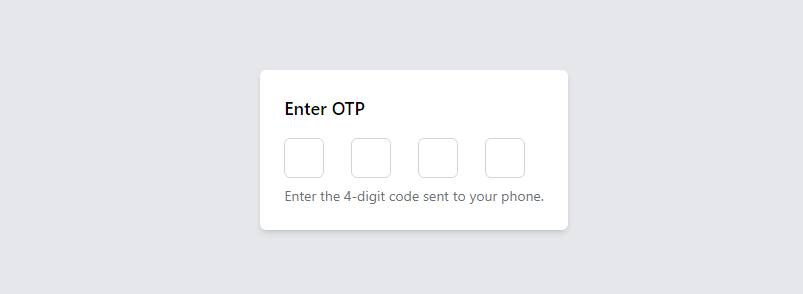
Create a 6-digit OTP input form using Tailwind CSS's grid classes.
<body class="bg-gray-200 flex items-center justify-center h-screen">
  <form class="max-w-md mx-auto bg-white p-6 rounded-md shadow-md">
    <h2 class="text-lg font-semibold mb-4">Enter OTP</h2>
    <div class="grid grid-cols-6 gap-2">
      <input type="text" class="w-10 h-10 text-lg border border-gray-300 rounded-md text-center outline-none" maxlength="1" pattern="[0-9]" inputmode="numeric">
      <input type="text" class="w-10 h-10 text-lg border border-gray-300 rounded-md text-center outline-none" maxlength="1" pattern="[0-9]" inputmode="numeric">
      <input type="text" class="w-10 h-10 text-lg border border-gray-300 rounded-md text-center outline-none" maxlength="1" pattern="[0-9]" inputmode="numeric">
      <input type="text" class="w-10 h-10 text-lg border border-gray-300 rounded-md text-center outline-none" maxlength="1" pattern="[0-9]" inputmode="numeric">
      <input type="text" class="w-10 h-10 text-lg border border-gray-300 rounded-md text-center outline-none" maxlength="1" pattern="[0-9]" inputmode="numeric">
      <input type="text" class="w-10 h-10 text-lg border border-gray-300 rounded-md text-center outline-none" maxlength="1" pattern="[0-9]" inputmode="numeric">
    </div>
    <p class="text-sm text-gray-500 mt-2">Enter the 6-digit code sent to your phone.</p>
  </form>
</body>
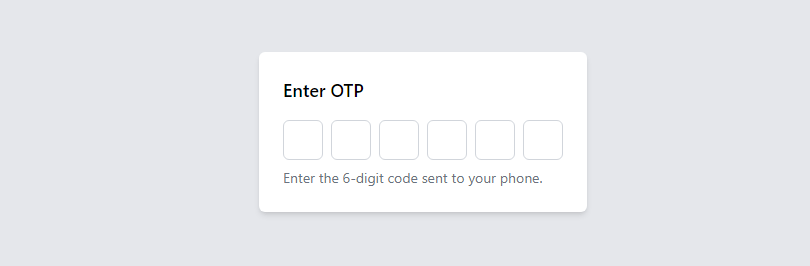
Tailwind CSS OTP Input with Rounded Corners and Border Animation.
<body class="bg-gray-200 flex items-center justify-center h-screen">
  <div class="max-w-md mx-auto bg-white p-6 rounded-md shadow-md">
    <h2 class="text-lg font-semibold mb-4">Enter OTP</h2>
    <div class="flex justify-center items-center gap-4">
      <div class="relative">
        <input type="text" class="w-10 h-10 text-lg border border-gray-300 rounded-full text-center focus:outline-none focus:border-blue-500 transition duration-300 ease-in-out" maxlength="1" pattern="[0-9]" inputmode="numeric">
        <input type="text" class="w-10 h-10 text-lg border border-gray-300 rounded-full text-center focus:outline-none focus:border-blue-500 transition duration-300 ease-in-out" maxlength="1" pattern="[0-9]" inputmode="numeric">
        <input type="text" class="w-10 h-10 text-lg border border-gray-300 rounded-full text-center focus:outline-none focus:border-blue-500 transition duration-300 ease-in-out" maxlength="1" pattern="[0-9]" inputmode="numeric">
        <input type="text" class="w-10 h-10 text-lg border border-gray-300 rounded-full text-center focus:outline-none focus:border-blue-500 transition duration-300 ease-in-out" maxlength="1" pattern="[0-9]" inputmode="numeric">
        <input type="text" class="w-10 h-10 text-lg border border-gray-300 rounded-full text-center focus:outline-none focus:border-blue-500 transition duration-300 ease-in-out" maxlength="1" pattern="[0-9]" inputmode="numeric">
        <input type="text" class="w-10 h-10 text-lg border border-gray-300 rounded-full text-center focus:outline-none focus:border-blue-500 transition duration-300 ease-in-out" maxlength="1" pattern="[0-9]" inputmode="numeric">
      </div>
    </div>
    <p class="text-sm text-gray-500 mt-2">Enter the 6-digit code sent to your phone.</p>
  </div>
</body>